Git supports following objects
Blobs
- The contents of files are stored as blobs.
- It is important to note that it is the contents that are stored, not the files. The names and modes of the files are not stored with the blob, just the contents.

Tree
- Directories in Git correspond to trees
- A tree is a simple list of trees and blobs that the tree contains, along with the names and modes of those trees and blobs. The contents section of a tree object consists of a very simple text file that lists the mode, type, name and sha of each entry.

Commit
- We can store arbitrary trees of content in Git, where does the ‘history’ part of ‘tree history storage system’ come in? The answer is the commit object.
- The commit is very simple, much like the tree. It simply points to a tree and keeps an author, committer, message and any parent commits that directly preceded it.

Tag
Git object data is a directed acyclic graph. That is, starting at any commit you can traverse its parents in one direction and there is no chain that begins and ends with the same object. All commit objects point to a tree and optionally to previous commits. All trees point to one or many blobs and/or trees. Given this simple model, we can store and retrieve vast histories of complex trees of arbitrarily changing content quickly and efficiently.
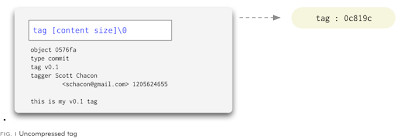
- The final type of object you will find in a Git database is the tag. This is an object that provides a permanent shorthand name for a particular commit.
- It contains an object, type, tag, tagger and a message. Normally the type is commit and the object is the sha-1 of the commit you’re tagging. The tag can also be gpg signed, providing cryptographic integrity to a release or version

Git object data is a directed acyclic graph. That is, starting at any commit you can traverse its parents in one direction and there is no chain that begins and ends with the same object. All commit objects point to a tree and optionally to previous commits. All trees point to one or many blobs and/or trees. Given this simple model, we can store and retrieve vast histories of complex trees of arbitrarily changing content quickly and efficiently.

No comments:
Post a Comment